Integration Testing
In software testing, integration tests are used to test the interaction between different parts of the system, such as the interaction between the database and other APIs and services.
Observing the testing pyramid, integration tests are often found in the middle of the pyramid, making them more expensive than unit tests but less expensive than end-to-end tests. In my career, I have seen many projects more oriented towards integration testing because they bring more value to the table than just unit tests. While they can create some false positives and negatives, they are still very important to have in your test suite.
One of the common problems that integration tests face is the state of the database and how to manage it, their slow execution, and strategies to make them faster. In this blog post, I will show you how to use Respawn, a small utility created by Jimmy Board to help in resetting test databases to a clean state for integration tests.
The Elephant in the Room: The State of the Database
When writing your integration tests, it’s crucial to ensure the database state is consistent before each test. This consistency is vital because it guarantees that each test is independent of the others, and that the database state does not influence the test outcomes.
Achieving this is straightforward with a few integration tests where database creation takes only a few seconds, and setting up a database for each test is feasible. However, with a large number of tests, this process can become time-consuming and significantly slow down your test suite.
How Can We Address this Challenge?
One solution is to utilize Respawn, a NuGet package designed to reset the database state before each test. By using Respawn, you can ensure the database is in the same state before each test, affirming that each test is independent of others regarding the database state.
Let me guide you through setting up Respawn in your integration tests and demonstrate its usage.
Setting up Respawn in Your Integration Tests
I have created a simple API project featuring a Customer Entity and CustomerEndpoint (minimal API) that interacts with the database. Additionally, I have implemented a database layer with a repository pattern, which you might find in your typical project.
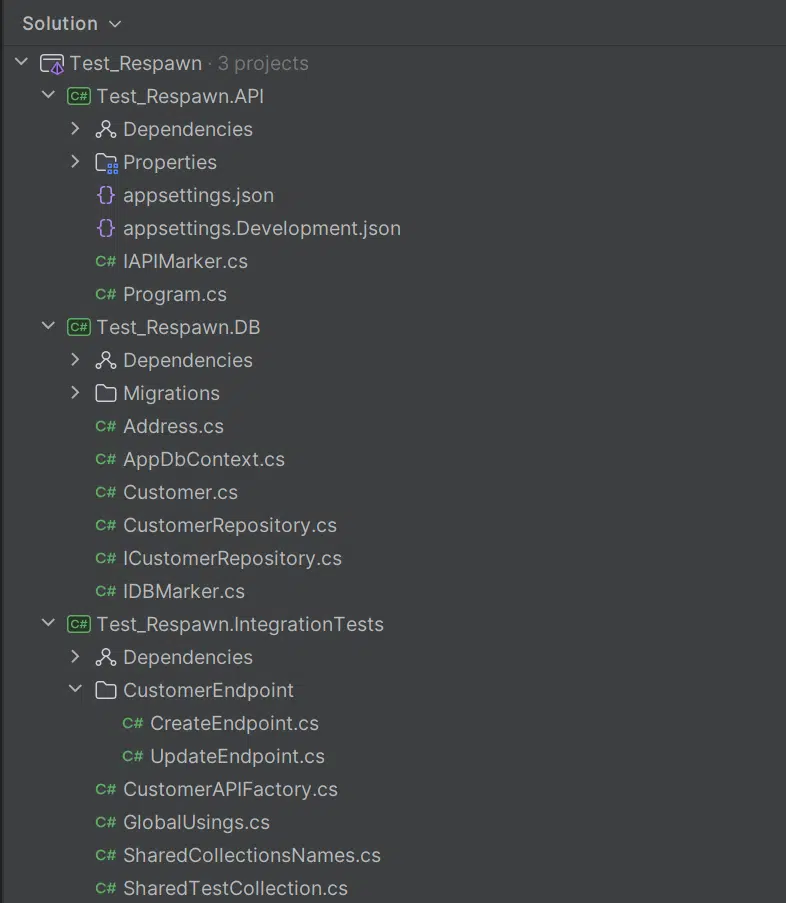
And let’s assume there’s a straightforward flow: from web client to API, then API to database.

Our aim is to test this flow with integration tests, ensuring the database state remains consistent before each test. I won’t delve into how I set up the API, however, I will demonstrate how to integrate Respawn in your integration tests.
When selecting a testing framework for your project, there are two popular opinions: XUnit and NUnit. Although both frameworks were developed by the same developers, XUnit is considered more modern, while many developers still view NUnit as the better option. For that reason, my preference is XUnit, so I will guide you through setting up Respawn with XUnit.
Setup Tests
First, you will need to create your XUnit test project. The common practice when naming test projects is to reflect what the test project represents. For example, if you were creating a unit test project, it might be named something like “MyProject.UnitTests.” In our case, since we are creating integration tests, we will name it “MyProject.IntegrationTests”
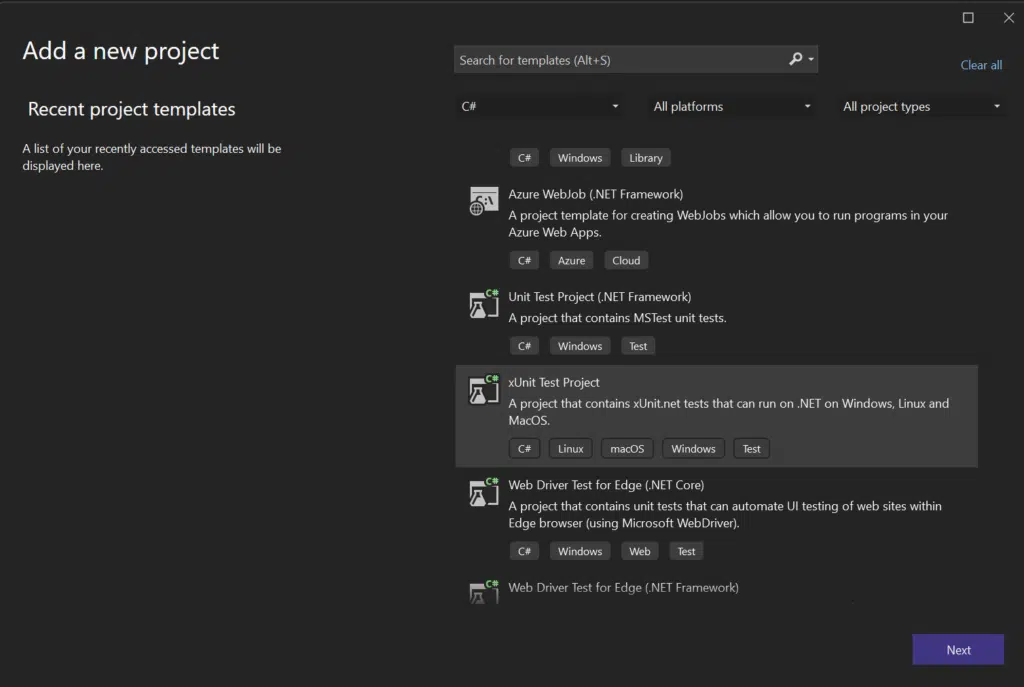
Once we’ve successfully created the XUnit project, we’ll need to add a few NuGet packages to our project:
- Bogus: A popular library for generating fake data, which is incredibly useful for creating realistic test scenarios without the need to manually craft data sets.
- FluentAssertions: A popular library for writing assertions in a more fluent, readable manner. It enhances test readability and the expressiveness of assertions.
- Microsoft.AspNetCore.Mvc.Testing: This library is essential for testing ASP.NET Core applications. It allows for integration testing by simulating server behavior and making requests to the endpoints in a way that closely resembles a real client-server interaction.
- Respawn: This is the library we’re focusing on for resetting the state of the database. It ensures that each test starts with a known state, which is critical for the reliability of integration tests.
These libraries collectively provide a robust foundation for writing, executing, and managing integration tests in projects that utilize ASP.NET Core and interact with databases.
Here are the dotnet CLI commands to add these packages:
dotnet add package Bogus
dotnet add package FluentAssertions
dotnet add package Microsoft.AspNetCore.Mvc.Testing
dotnet add package Respawn
With those libraries in place, it’s time to delve into our two integration tests.
Create Endpoint Tests
using Test_Respawn.DB;
using static Test_Respawn.IntegrationTests.SharedCollectionsNames;

namespace Test_Respawn.IntegrationTests.CustomerEndpoint;

[Collection(SHARED_API_COLLECTION)]
public class CreateEndpoint(CustomerAPIFactory apiFactory)
{
    private readonly HttpClient _httpClient = apiFactory.HttpClient;

    private static readonly Faker<Address> _addressFaker = new Faker<Address>()
        .RuleFor(x => x.City, f => f.Address.City())
        .RuleFor(x => x.PostalCode, f => f.Address.ZipCode());

    private static readonly Faker<Customer> _customerFaker = new Faker<Customer>()
        .RuleFor(x => x.FirstName, f => f.Person.FirstName)
        .RuleFor(x => x.LastName, f => f.Person.LastName)
        .RuleFor(x => x.Email, f => f.Person.Email)
        .RuleFor(x => x.PhoneNumber, f => f.Person.Phone)
        .RuleFor(x => x.Address, _ => _addressFaker.Generate());

    [Fact]
    public async Task Create_WhenValid_ShouldReturnId()
    {
        // Arrange
        var customer = _customerFaker.Generate();
        // Act
        var response = await _httpClient.PostAsJsonAsync("api/customer", customer);

        // Assert
        response.StatusCode.Should().Be(HttpStatusCode.OK);
    }
}
Update Endpoint Tests
using Test_Respawn.DB;
using static Test_Respawn.IntegrationTests.SharedCollectionsNames;

namespace Test_Respawn.IntegrationTests.CustomerEndpoint;

[Collection(SHARED_API_COLLECTION)]
public class UpdateEndpoint(CustomerAPIFactory apiFactory)
{
    private readonly HttpClient _httpClient = apiFactory.HttpClient;

    private Customer _customer => new()
    {
        FirstName = "John",
        LastName = "Doe",
        Email = "johndoe@johndoe.com",
        PhoneNumber = "123456789",
    };

    [Fact]
    public async Task Update_FirstName_Only_ShouldNotUpdateOtherProperties()
    {
        // Arrange
        var customer = _customer;

        // Act
        await _httpClient.PostAsJsonAsync("api/customer", customer);

        // Intentionally bad code to demonstrate the problem
        var updateResponse = await _httpClient.PutAsJsonAsync("api/customer", new Customer
        {
            Id = 1,
            FirstName = "Jane"
        });

        var updatedCustomer = await updateResponse.Content.ReadFromJsonAsync<Customer>();

        // Assert
        updateResponse.StatusCode.Should().Be(HttpStatusCode.OK);
        updatedCustomer!.FirstName.Should().Be("Jane");
        updatedCustomer.Should().BeEquivalentTo(_customer, opt =>
        {
            opt.Excluding(e => e.Id);
            opt.Excluding(e => e.FirstName);
            return opt;
        });
    }
}
If I were to run these tests, one would succeed, but the other would fail. You might wonder why this happens. Let’s try to illustrate and understand the underlying reasons for this outcome. By examining the differences between the two tests and their interactions with the database
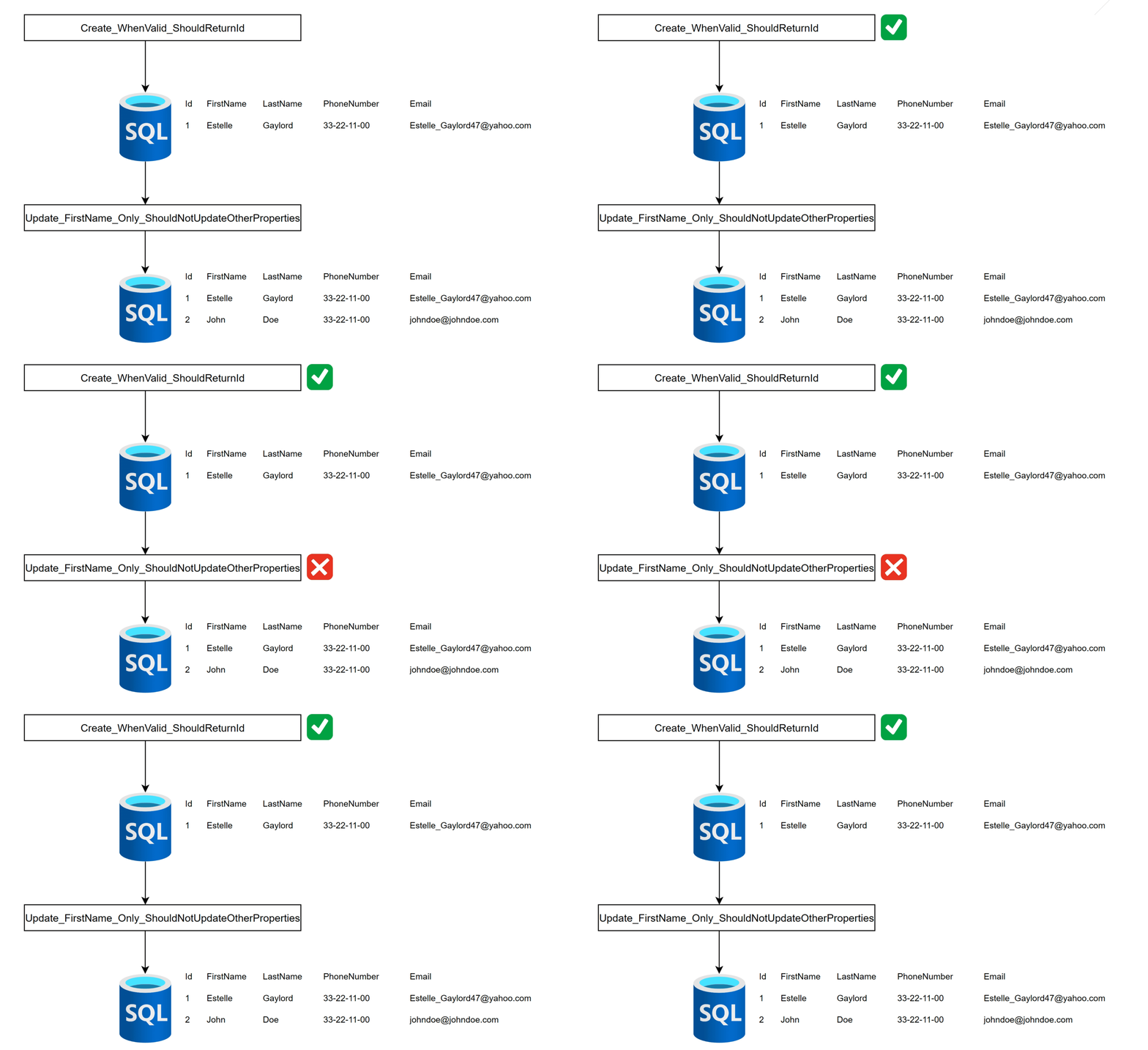
Now that we have a better understanding, it’s clear why the test ‘Create_WhenValid_ShouldReturnId’ results in the database being in a ‘dirty’ state. The database is not in a clean state after this test, and the test ‘Update_FirstName_Only_ShouldNotUpdateOtherProperties’ relies on the database being in a clean state for its execution.
This scenario illustrates why coupling tests together, which depend on the database’s state from a previous test, is a common mistake. It underscores the importance of ensuring each test is independent and starts with a known, clean database state to avoid unintended interactions and dependencies between tests.
Let’s fix this by configuring Respawn.
Respawn Configuration
using Respawn;
using Test_Respawn.API;

namespace Test_Respawn.IntegrationTests;

public class CustomerAPIFactory : WebApplicationFactory<IAPIMarker>, IAsyncLifetime
{
    private Respawner _respawner = default!;

    private const string _connectionString = "Server=localhost;Database=Test_Respawn;User Id=sa;Password=strong_password;TrustServerCertificate=true;";

    public HttpClient HttpClient { get; private set; } = default!;

    public async Task ResetDatabaseAsync() => await _respawner.ResetAsync(_connectionString);

    public async Task InitializeAsync()
    {
        HttpClient = CreateClient();
        _respawner = await Respawner.CreateAsync(_connectionString, new RespawnerOptions
        {
            DbAdapter = DbAdapter.SqlServer,
            WithReseed = true,
            SchemasToInclude = ["dbo"]
        });
    }

    public new async Task DisposeAsync()
    {
        await ResetDatabaseAsync();
    }
}
Let me break down what’s happening here. The CustomerAPIFactory is a standard WebApplicationFactory that inherits from the IAsyncLifetime interface. This setup introduces two crucial methods: InitializeAsync and DisposeAsync. The IAsyncLifetime interface ensures that, for each test run, InitializeAsync is called before the test starts, setting up the necessary environment, and DisposeAsync is called after the test finishes to clean up resources.
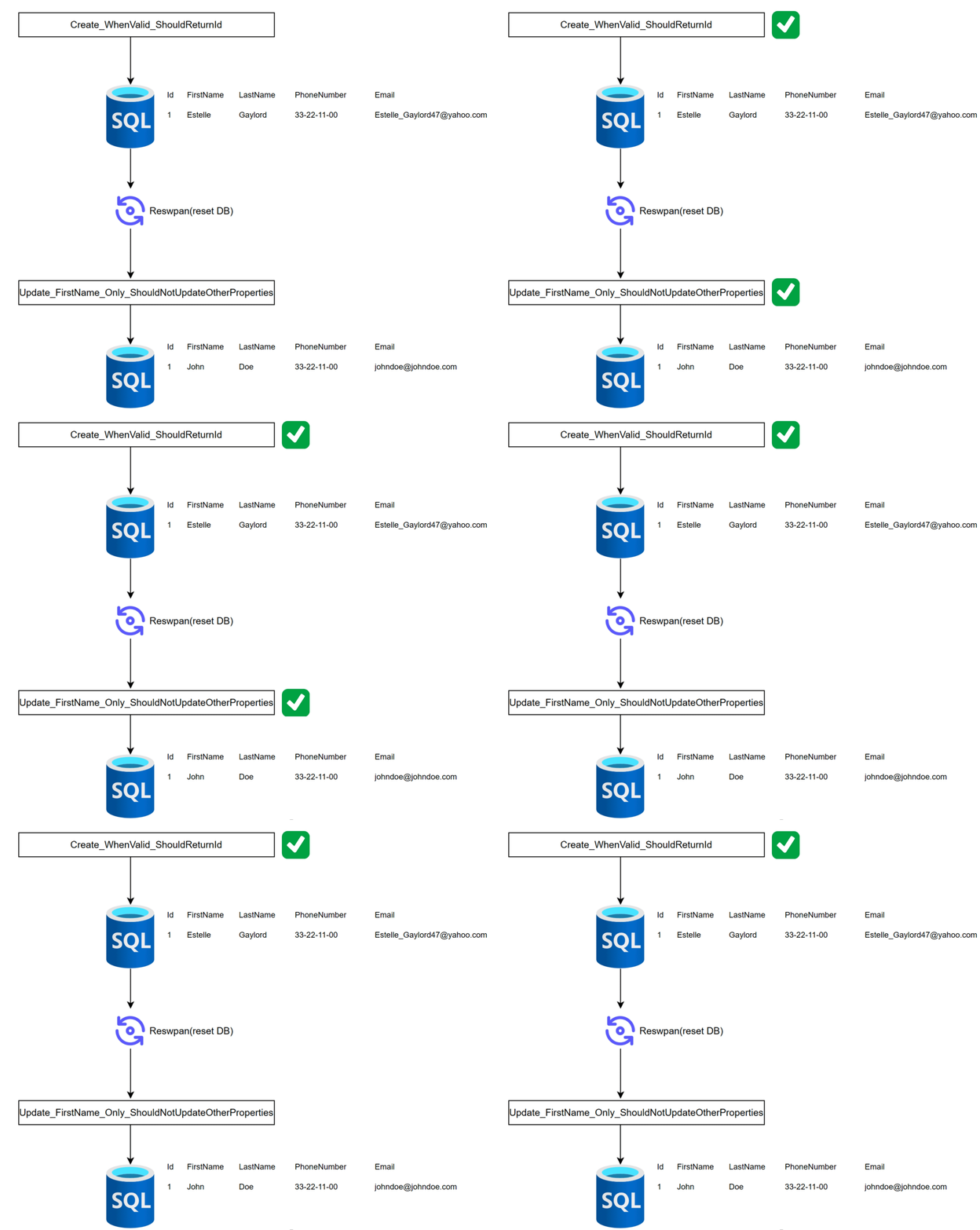
By integrating IAsyncLifetime with Respawn, we achieve a mechanism where before each test starts, Respawn is used to reset the database to a clean state. This approach addresses the issue of tests affecting each other due to shared state in the database.
With Respawn ensuring a clean database before each test, and with adjustments made to the other two tests to accommodate this setup, all tests should now pass. This method guarantees that each test is independent, promoting more reliable and accurate test outcomes.
Conclusion
In conclusion, the integration of Respawn with our testing framework using the IAsyncLifetime interface in the CustomerAPIFactory demonstrates a powerful approach to ensuring the reliability and independence of integration tests. This methodology addresses common pitfalls associated with testing environments where a shared state can lead to unpredictable outcomes.
By leveraging Respawn to reset the database state before each test, we maintain a clean testing environment, ensuring that each test runs under consistent conditions. We also get a database reset process that is as fast as possible. This setup not only facilitates a more streamlined testing process but also significantly reduces the chances of tests failing due to dependencies on the database state set by previous tests.
If you’d like help implementing this strategy in your integration test, contact Trailhead about it, and we can help you get started.