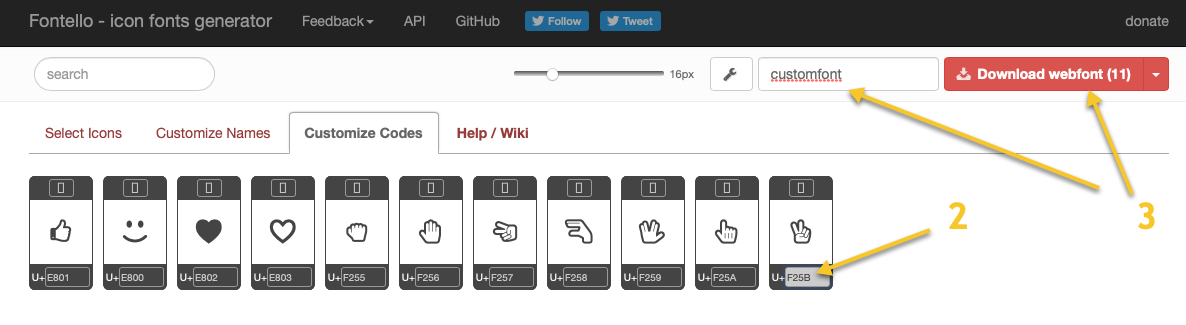
- Select icons that you’re interested in or upload an SVG;

- Write down the icons codes, we’ll need them later;
- Set a font name and hit the download button.
Android

iOS


<key>UIAppFonts</key>
<array>
    <string>customfont.ttf</string>
</array>
Xamarin Forms Project
At this point, we have everything ready to use the icons in the app. Let’s add a new item to the ResourceDictionary in the App.xaml to handle platform specific differences:
<OnPlatform x:Key="CustomFont" x:TypeArguments="x:String">
    <On Platform="Android" Value="customfont.ttf#fontello" />
    <On Platform="iOS" Value="customfont" />
</OnPlatform>
And finally the icons. Add a label to a page, set the FontFamily and the Text properties:
<Label Text="&xe803;" x:Name="Heart" FontFamily="{StaticResource CustomFont}" FontSize="30" TextColor="White"/>
Notice that we’re using the codes that we wrote down from the Fontello service here. To make the XAML code a bit cleaner we can move all properties to a style and set only the icon code (Text property) in the label. Or even create separate styles for all frequently used icons:
<Style x:Key="Icons" TargetType="Label">
<Setter Property="FontFamily" Value="{StaticResource CustomFont}" />
<Setter Property="FontSize" Value="30" />
<Setter Property="TextColor" Value="White" />
<Setter Property="WidthRequest" Value="40" />
</Style>
<Style x:Key="LikeIcon" BasedOn="{StaticResource Icons}" TargetType="Label">
<Setter Property="Text" Value=" ;"/>
</Style>
<Label Text="" Style="{StaticResource Icons}" />
<Label Style="{StaticResource LikeIcon}" />
It’s also possible to update the text programmatically from the code-behind or via bindings from the view model. E.g. when you want to show an arrow indicating the sort order:
public string SortIconFullName => _sortBy == "fullname" ? (_sortAsc ? "\uE5C7" : "\uE5C5") : string.Empty;
public string SortIconEmail => _sortBy == "email" ? (_sortAsc ? "\uE5C7" : "\uE5C5") : string.Empty;
And finally a nice bonus — since this is just a label with some text (or any other control with a text), you can easily change the color, size or even add an animation. You can find a sample project here: https://github.com/vecalion/Xamarin.IconFontDemo
Happy coding!