
This blog is presented as a part of C# Advent 2025. Follow the link to check out the rest of the excellent C# and .NET content coming out in 2 blogs per day between December 1 and 25.Big shout-out to Dave Miller, whose famous YouTube video inspired this project. He laid out some pretty good groundwork for how the evolutionary algorithms work. For the purpose of spending time productively, I will assume you’ve watched at least the first 15 minutes of it.
In this blog post we will simulate an evolution of creatures that start with random genes, and over time evolve to survive in a world where only the corners of the map promote reproduction. They will essentially learn to do this:
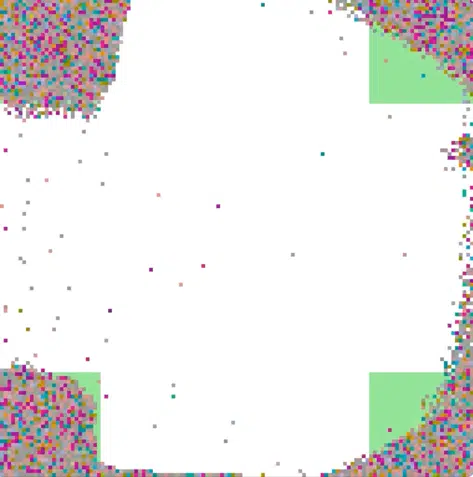
We will not code that logic, rather allow them to grow their own little neural networks and through a process of natural selection, generation by generation, select those genes (neural networks) that solve the puzzle we gave them best.
This is going to happen through generations and cycles. Each generation will consist of 300 cycles throughout which a creature will be able to act (e.g. move in a different directions). What the creature does will depend on the neurons that it has (we will call it a genome). Initially we will randomly generate all genomes and after every generation we will randomly pair them to create offspring. We will only allow it to happen in the green reproduction areas. Only the offspring genomes carry over to the next generation. Initial position of all creatures is always random.
Creature Brain
Creature brains are intentionally simple, but still take time to process. The runtime depends on how many generations you run: ~100 generations take seconds; ~100,000 might need to run overnight.
Here’s a random neural network for a creature with two genes (each gene defines a connection between two neurons). It has two input neurons whose outputs depend on the X and Y axis positions, one internal neurons(think of them as aggregators), and one output neuron allowing it to move up.
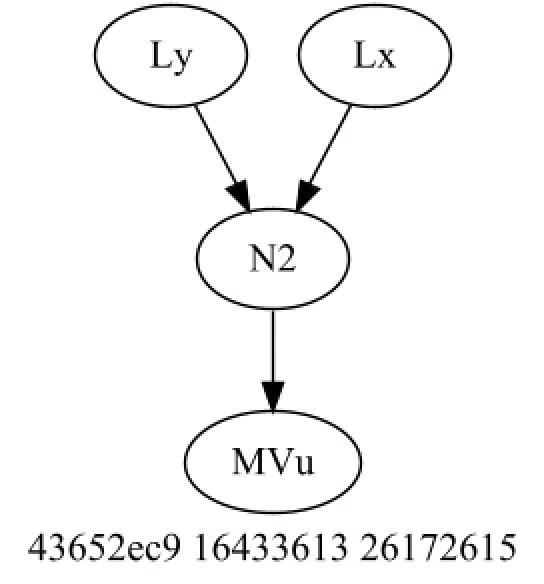
In every cycle, we compute the source neurons via:
Tanh(input * weight)and sink neurons via:
Tanh(sum(inputs) * weight)Neurons always produce a value in [-1, 1]. If the value is greater than zero, the output neuron fires; otherwise it does not. Because sink neurons hold a collection of source connections, it’s easiest (and fastest) to compute from the outputs backward—more on that later.
One final remark before we continue. Neural networks that we will generate might end up having no input neurons, no internal neurons or no output neurons. If the creature’s genome has no output neurons, it will most definitely not pass it genes, that’s why in the last generation you will not see them.
Application Startup
When the app starts, the SimulationContext is registered in the DI container so any part of the app (Simulation, Agent, Neuron) can use it without plumbing it through call chains.
var context = new SimulationContext(
    WorldSize: 128,
    Population: 2000,
    GenomeSize: 8,
    Generations: 1,
    Cycles: 300,
    Zoom: 5,
    MutationChance: 0,
    TerrainProvider: TerrainProviders.FourCorners);
builder.Services.RegisterServices(context);

CancellationTokenSource cts = new();

using IHost host = builder.Build();
var simulation = host.Services.GetRequiredService<Simulation>();
await simulation.RunAsync(cts);
World Creation
Simulation is a procedural wrapper that drives the process. It starts by creating the world with rectangle boundaries and an array of terrain objects. IWorldTerrainProvider lets you choose a “map” via SimulationContext. The map defines blocked areas and reproduction zones (implemented as rectangles, too).
// Prepare the world
var worldBlock = new Rectangle(0, 0, context.WorldSize, context.WorldSize);

var terrainProvider = provider.GetRequiredKeyedService<IWorldTerrainProvider>(context.TerrainProvider);

var world = new World(WorldBlock: worldBlock, Terrain: terrainProvider.GetWorldTerrain(worldBlock))
    {
    Agents = Enumerable.Range(0, context.Population).Select(_ => agentFactory.CreateDefaultAgent()).ToArray()
};

public record World(Rectangle WorldBlock, WorldTerrain[] Terrain) : IWorld
{
    public required Agent[] Agents { get; set; }
    private GridCell[,] Grid { get; set; } = new GridCell[WorldBlock.Width, WorldBlock.Height];

    public void DistributeAgents()
    {
        ...
    }

    public bool Move(IAgent agent, Vector2Int dest)
    {
        ...
    }
}

public record WorldTerrain(Rectangle Boundary, TerrainType Terrain, Color Color);

[Flags]
public enum TerrainType
{
    None = 1 << 0,
    Blocked = 1 << 1,
    Reproduce = 1 << 2
}
Let’s create the four-corners terrain provider you saw in the intro.
public class FourCornersTerrainProvider : IWorldTerrainProvider
{
    private static int _ratio = 6;

    public WorldTerrain[] GetWorldTerrain(Rectangle world) =>
    [
        new(
            new(0, 0, world.Width / _ratio, world.Height / _ratio),
            TerrainType.Reproduce,
            Color.LightGreen
        ),
        new(
            new(world.Width - world.Width / _ratio, 0, world.Width, world.Height / _ratio),
            TerrainType.Reproduce,
            Color.LightGreen
        ),
        new(
            new(0, world.Height - world.Height / _ratio, world.Width / _ratio, world.Height),
            TerrainType.Reproduce,
            Color.LightGreen
        ),
        new(
            new(world.Width - world.Width / _ratio, world.Height - world.Height / _ratio, world.Width, world.Height),
            TerrainType.Reproduce,
            Color.LightGreen
        ),
    ];
}
The world also defines an Agents array and a 2D Grid. Agents is set initially and replaced with offspring after each generation (parents do not carry over). The grid is reset each generation as well. DistributeAgents is called before each generation and places agents randomly in allowed areas.
The Move method moves agent from current to a new position. Simulation doesn’t use this method, Agent does. This is because an agent might have a genome telling it to move up, down, left or right (or more depending on the genome size).
So instead, the simulation tells the agent to process a cycle (as you will see in a moment) and it uses the IWorld handle to move itself upon the grid.
Process Generations
Once the world is created, we process generations. For each generation we:
- Distribute new agents (offspring)
- Process the cycles (each agent has a chance to move)
- Select offspring for the next generation
// Process generations
for (int g = 1; g <= context.Generations; g++)
{
    world.DistributeAgents();

    // Process cycles
    for (int c = 1; c <= context.Cycles; c++)
    {
        ...
    }

    // select winners and reproduce
    List<Agent> newPopulation = [];

    var areas = world.Terrain
        .Where(x => x.Terrain == TerrainType.Reproduce)
        .Select(x => x.Boundary)
        .ToArray();
    var winners = world.Agents
        .Where(agent => areas.Any(x => x.Contains(new Point(agent.Position.x, agent.Position.y))))
        .ToArray();

    while (newPopulation.Count < context.Population)
    {
        var p1 = random.Next(0, winners.Length);
        var p2 = random.Next(0, winners.Length);
        var child = agentFactory.CreateCrossoverAgent(winners[p1], winners[p2]);
        newPopulation.Add(child);
    }

    world.Agents = newPopulation.ToArray();
}
Process Cycles
Processing cycles is as simple as calling ProcessCycle method on each agent.
context.CurrentCycle = c;

foreach (var agent in world.Agents.OrderBy(_ => random.Next()))
    agent.ProcessCycle(world);
In the GitHub repo we also generate a PNG image per cycle showing agents, blockades, and reproduction zones. Later we use ffmpeg to merge all cycle snapshots into a video for that generation.
Agent
This is where things get interesting. In the Agent code you can immediately see the ProcessCycle method invoked above: it simply iterates over the output neurons and attempts to activate each one (this triggers a recursive output processing until it reaches the input neurons).
public void ProcessCycle(IWorld world)
{
    foreach (var neuron in Brain.OutputNeurons.OrderBy(_ => _random.Next())) neuron.Activate(world, this);
}
Each agent also has a genome (collection of genes) that is either random or created from parent genes. A Gene defines a connection between two neurons (along with its weight, used in the output calculation).
public class Genome
{
    public required Gene[] Genes { get; init; }
}

public record Gene
{
    public Type SourceNeuronType { get; }
    public Type SinkNeuronType { get; }
    public double Weight { get; }
}
The gene constructor (not shown) creates two neurons and a weight. We use the same method to randomize genes as in David’s video: generate a 32-bit number that defines the source neuron, sink neuron, and weight.
With GenomeSize = 8 (as set in SimulationContext), our agent has a neural network consisting of eight connections. Here’s an example of such creature’s Brain:
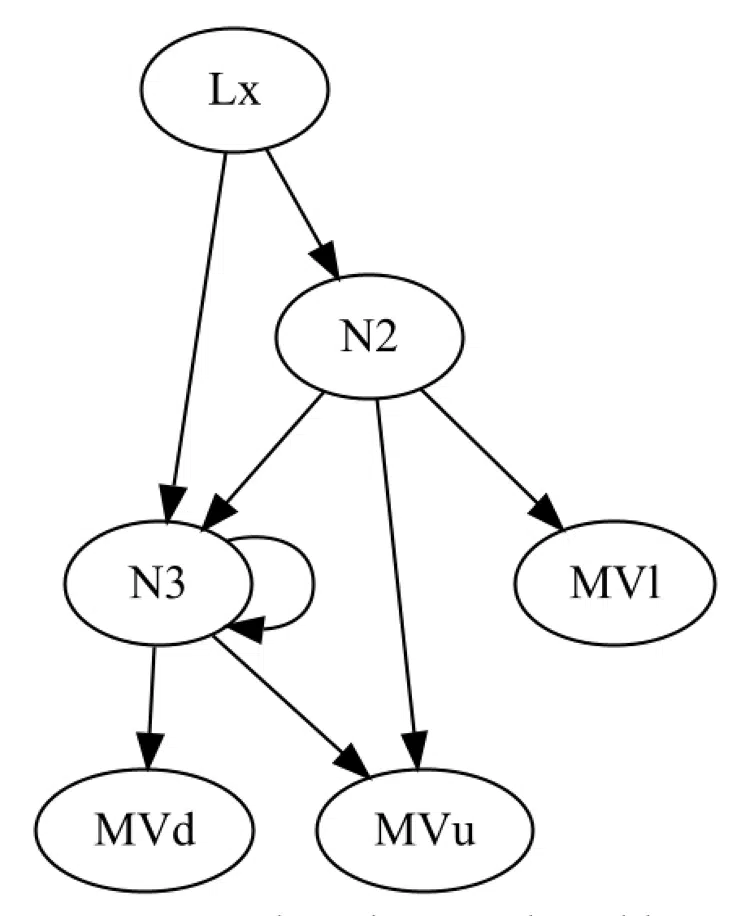
It has a firing neuron Lx that produces a value depending on it’s position on the X axis
public class Lx(SimulationContext context) : InputNeuronBase
{
    public override double CalculateOutput(IAgent agent, double weight) =>
        CalculateOutput((double)agent.Position.x / (context.WorldSize - 1), weight);
}
Internal neurons N2 and N3 in this case act exactly as output neurons. They simply output a tangent function of sum of its inputs, multiplied by weight.
public abstract class InternalNeuronBase : IInternalNeuron
{
    public abstract double LatchedOutput { get; set; }
    public ICollection<(ISourceNeuron Source, double Weight)> SourceConnections { get; set; } = [];
    private bool CycleGuard { get; set; }

    public double CalculateOutput(IAgent agent, double weight)
    {
        if (CycleGuard) return LatchedOutput;

        CycleGuard = true;

        if (SourceConnections.Count != 0)
        {
            LatchedOutput = SourceConnections.Sum(c => c.Source.CalculateOutput(agent, c.Weight));
        }

        LatchedOutput = Tanh(LatchedOutput * weight);

        CycleGuard = false;

        return LatchedOutput;
    }
}
Internal neurons N2 and N3 behave like output neurons in terms of computation: they output
tanh(sum(inputs) * weight)If an internal neuron acts as a source (no source connections), it outputs a predefined constant value.
public class N2 : InternalNeuronBase
{
    public override double LatchedOutput { get; set; } = 0.12;
}
Last but not least, output neurons define a Fire function (e.g. move creature down by one grid cell).
public class MVd : OutputNeuronBase
{
    protected override void Fire(IWorld world, IAgent agent) =>
        world.Move(agent, agent.Position with { y = agent.Position.y + 1 });
}
Output neurons don’t always fire; they only do so if
tanh(sum(inputs) * weight) > 0The base class handles activation on each cycle.
public abstract class OutputNeuronBase : IOutputNeuron
{
    public ICollection<(ISourceNeuron Source, double Weight)> SourceConnections { get; set; } = [];

    protected abstract void Fire(IWorld world, IAgent agent);

    public void Activate(IWorld world, IAgent agent)
    {
        if (IsActive(agent))
        {
            Fire(world, agent);
        }
    }

    private double CalculateOutput(IAgent agent) => Tanh(SourceConnections.Sum(c => c.Source.CalculateOutput(agent, c.Weight)));

    private bool IsActive(IAgent agent) => CalculateOutput(agent) > 0;
}
Agent’s Brain and how it works
Let’s recap:
- An agent has a genome (random or inherited).
- A genome consists of genes.
- A single gene defines a connection between two neurons.
- The simulator calls the agent’s ProcessCycle.
- ProcessCycle activates the brain’s output neurons
- Output neurons trigger computation of connected source neurons or internal neurons
Let’s now take a look at the Agent’s constructor where the brain is built.
var neuronFactory = ServiceScope.ServiceProvider.GetRequiredService<INeuronFactory>();

foreach (var gene in genome.Genes)
{
    var sourceNeuron = neuronFactory.GetSourceNeuron(gene.SourceNeuronType, this);
    var sinkNeuron = neuronFactory.GetSinkNeuron(gene.SinkNeuronType, this);

    if (!sinkNeuron.SourceConnections.Select(x => x.Source).Contains(sourceNeuron))
    {
        sinkNeuron.SourceConnections.Add((sourceNeuron, gene.Weight));
    }

    if (sinkNeuron is IOutputNeuron outputNeuron && !Brain.OutputNeurons.Contains(sinkNeuron))
    {
        Brain.OutputNeurons.Add(outputNeuron);
    }
}
Now, here’s the agent constructor logic that builds the brain from the genome. It creates source and sink neuron instances and chains them together. Output neurons are added to the brain explicitly; other neurons are already linked internally. We process cycles from the bottom (output neurons first). While it can seem counter-intuitive—neural networks “fire” from sources forward—this greatly improves performance (we don’t waste time processing genomes that have no output neurons).
Note: INeuronFactory is created from the DI container in the context of an Agent. If the genome defines two genes with the same neuron type (e.g., Lx), only one instance of that neuron is created for that agent. This encourages a larger, connected network rather than many tiny, duplicated subgraphs.
Example Walkthrough
Imagine a world with one creature, one generation, and one cycle. Here’s the order of operations:
1. Simulation calls agent.ProcessCycle:
foreach (var agent in world.Agents.OrderBy(_ => random.Next()))
    agent.ProcessCycle(world);
2. Each of the agent’s output neurons get activated
foreach (var neuron in Brain.OutputNeurons.OrderBy(_ => _random.Next())) neuron.Activate(world, this);3. Each output neurons’ source gets calculated recursively as per:
private double CalculateOutput(IAgent agent) => Tanh(SourceConnections.Sum(c => c.Source.CalculateOutput(agent, c.Weight)));Next Steps
Feel free to clone and run the simulator. Here’s the GitHub link to a repo. If you have any questions reach out to me or contact us at Trailhead to get our help building something cool for you with neural networks.


