This blog is presented as a part of C# Advent 2024. Follow the link to check out the rest of the excellent C# and .NET content coming out in 2 blogs per day between December 1 - 25.It’s not an exaggeration to say that today, most of the code we ship is someone else’s code. Sonatype releases an annual State of the Software Supply Chain report. In the 2024 edition of the report they estimate that upward of 90% of software comprises open source components rather than components written in-house. Keeping in mind that Sonatype sells software supply chain risk management tools and services and has a motivation to find that number to be high, we can probably safely assume that a full 2/3 of our software is written as open source or otherwise third-party components.
This reliance on external code introduces significant potential risks. Fortunately, a robust ecosystem of tools has emerged to identify vulnerabilities in third-party components. In the .NET ecosystem, NuGet has included a built-in vulnerability scan utility since 2021, which flags publicly known issues associated with the NuGet packages in use. If you haven’t started scanning for these vulnerabilities yet, I’ve previously shared a proposed approach to help you establish a scanning practice within your organization.
In this blog, we’ll not only touch on how to scan for vulnerabilities but focus on the often-overlooked step: understanding and acting on the results of those scans.
What to Do with Vulnerability Findings
There has been a lot written on how to scan for these vulnerabilities, but comparatively little on how to actually deal with the results once you have them. Below, I will give you with some guidance on how to think through the results of a scan finding. To do this, I will walk you through a case study of a real finding generated for a Nuget package in a real C# application and use that as an opportunity to talk about the kinds of things you need to think about when working through these findings.
Case #1: Application Is Not Vulnerable
The Findings
In this case, I am going to use the built-in .NET scan utility to identify issues. Suppose that we run the scanner and receive the following findings.
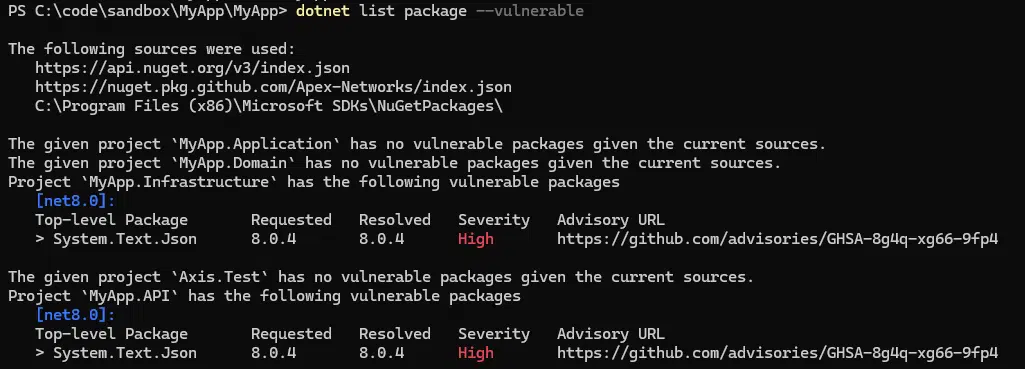
Those bright red “High” severity warnings look really bad. While our impulse might be to panic and just update the package, there are also potential risks involved in haphazardly upgrading. What if you have a release coming up this weekend? What if your application is incompatible with the latest version of the component? It’s always wise to plan for the necessary regression testing to go with any package updates. So, what is to be done?
The Approach
It’s important to remember that even though a component might have a vulnerability it doesn’t mean your application is vulnerable to the exploit. It is often the case that vulnerability depends on use case, or though less common, that the tool has misidentified a package and that this is a false positive. With that in mind, let’s take a look at the advisory bulletin to see what we can learn about the issue. Following the link provided in the tool output takes us to a GitHub security advisory.

In the executive summary is the following:

So, it seems that the mere presence of the library is not enough for the application to be vulnerable. This leaves us with a couple of options:
- If the application is not using the JsonExtensionData attribute then it is not vulnerable. In this case we are free to leave it as-is and plan for an upgrade on a more controlled timeline.
- Even if the application is using JsonExtensionData, it might still be possible to protect the app with validation. Remember, we never want to do denylist validation, only allowlist. This option also depends on having more knowledge of the issue than is provided in the bulleting, however, if for whatever reason your app is working with a limited range of potential inputs it may be possible to automate testing all of them for any issues.
All in all, this turns out to be a very narrow and negligible finding no matter how bright red the text was in the report.
Case #2: Application Is Vulnerable
Let’s look at one more. In the next example we will look at a result generated from a tool called Snyk. The result of the scan is a Remote Code Execution (RCE) vulnerability.
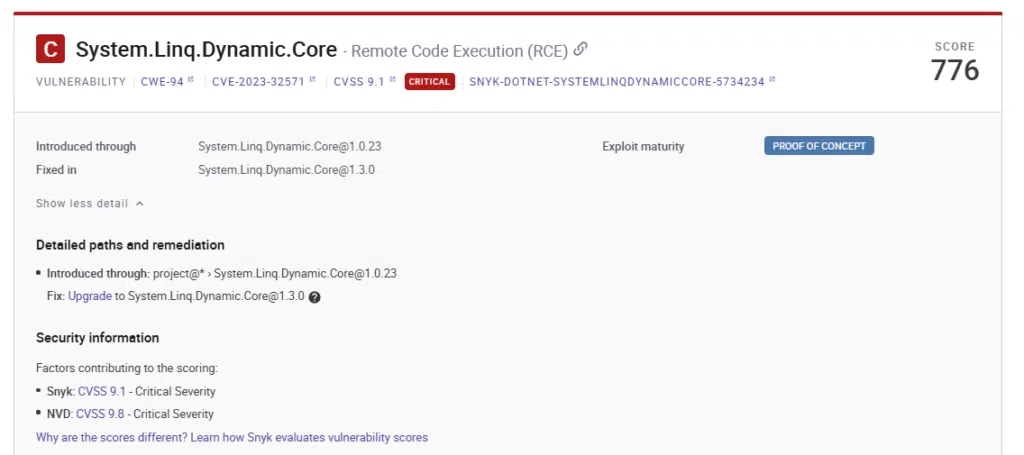
We can see that the fix action here is to upgrade the System.Linq.Core but, as we mentioned previously, there may be good reasons not to want to do this with a short runway. So, let’s look at the supplemental information. In this case we’ll follow the link to the NVD.
It always pays to check the links associated with an NVD record, and in this case, we hit the jackpot. We will follow the link in the second row that is tagged as an exploit.
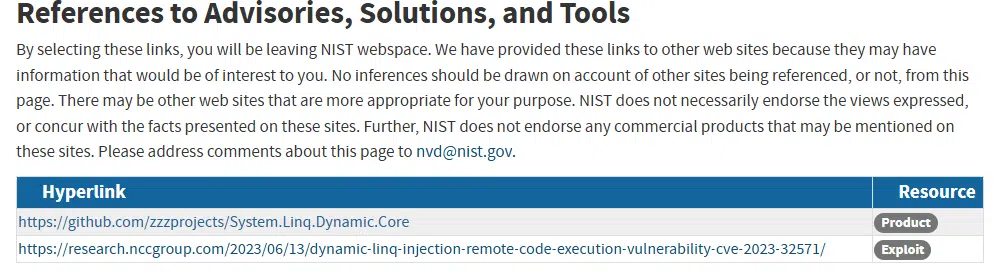
The link takes us to a blog that actually includes sample code demonstrating the exploit, along with clarifying context around successfully testing it.

Let’s suppose in this case that we have an application that is vulnerable to this weakness. This sample exploit code could be used as a foundation for a unit test that will do the following:
- Document, in code, the manner in which the code could be exploited.
- Ensure that the exploit is fixed after the upgrade,
- Make it very obvious if someone tries to downgrade the package, since the test will start failing.
As you can see, taking the time to understand the findings can help
A Step-By-Step Approach
In both of these scenarios, we followed a similar approach:
- Triage the findings and work from the highest severity first. Note that high severity != definitely vulnerable. This is simply an indicator of the potential magnitude of the issue in the event that the application is found vulnerable.
- Identify the impacted library for a given findings.
- Follow the links to read more about the issue.
- Based on what you learn, make a plan that fits your circumstances. Consider the timing of the finding, the application roadmap, the user base, the availability of access to the application, etc. It can mean changing the code, upgrading a package, or even temporarily doing nothing depending on the case.
Note that what we absolutely don’t want to do is blindly attack a list of findings and perform mass upgrades. Carelessly fixing what isn’t broken can be more dangerous than the very findings you are attempting to resolve.
Summary
I hope that this case study has demonstrated that simply looking at a list of findings devoid of context can frequently lead you to either overreact or underreact. There is tremendous value in using the tools that are available to gain a better understanding of the threat environment for your code.
If this is something you would like to learn more about or would like some help with, the professionals here at Trailhead are available to help.