We’ve seen the same pattern at almost every client. The backlog has a top half and a bottom half, and the top half is the active list. From it features are being shipped and bugs are being fixed. The bottom half, though, just gets longer, filled with the things everyone agrees should be done, but nobody has the time or budget to do.
AI-assisted development is shifting the math on these formerly high-impact, high-cost items. In many cases, if AI is in the right hands, it can bring yours costs way down, making these now high-impact and lower-cost work.
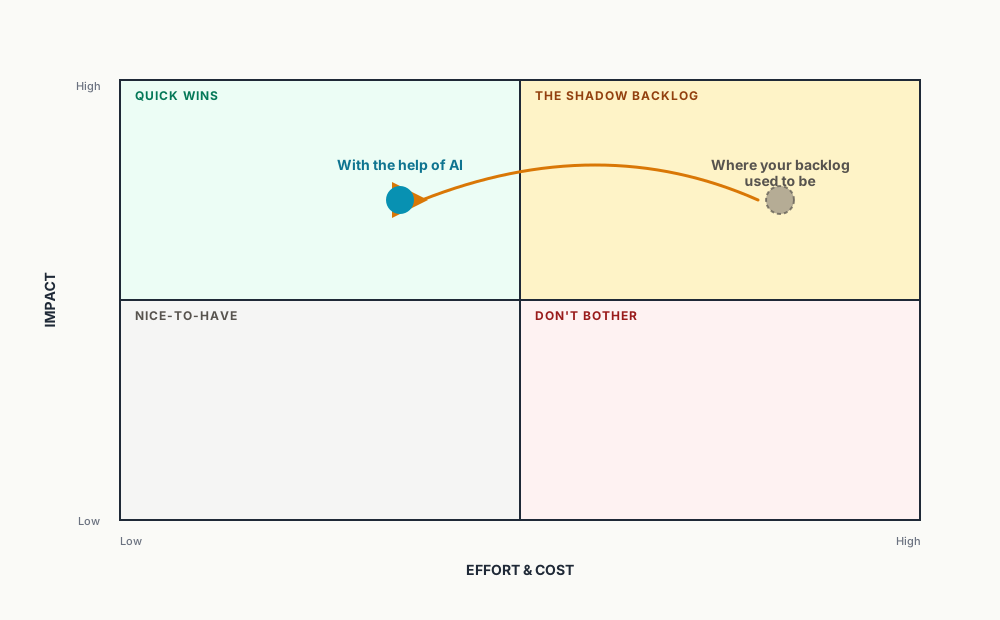
In this blog, I’ve highlighted some of the most common cases we’re seeing where AI can help you clear your backlog. I hope it will help you start thinking about your own backlog and what you can finally get done that wasn’t worth it before.
Quality Work That Slipped
Full Unit Test Coverage
Unit tests: developers hate writing them and stakeholders hate paying for them. Their value is extremely high, though. They are the most likely way you’ll know about a bug before it impacts anyone in production, and they’re the only safe way off allowing refactoring and other changes to codebases without accidentally breaking things.
AI is exceptionally good at this type of task. It reads existing code, generates sensible test cases, and gets you to a real coverage number in days instead of months. You still need a senior reviewer making sure the tests are testing the right things instead of just covering lines, but the bulk of the typing is gone.
Automated End-to-End Testing
Just like unit tests, end-to-end (e2e) testing provides a great deal of value, but can be even harder to rationalize. E2E suites have always been worth it in theory, giving you full confidence that all your key features works in exactly the way they will really be used by your users. They are often skipped in practice, though, because writing and maintaining them is so expensive and ongoing.
AI can author Playwright or Cypress flows from descriptions, screenshots, recordings, or live systems, and keep them updated for you automatically when the UI shifts over time.
Observability Retrofit
Adding OpenTelemetry to an existings system that doesn’t have good observabilityh is a textbook example of a tedious-but-valuable project. With great observability in place, every single issue is faster to understand and fix.
Whether its instrumenting handlers, wrapping clients, propagating context, or standardizing log shapes, all if it is right in AI’s wheelhouse.
Security Hardening
It’s always been worthwhile to do dependency upgrades, patch vulnerable classes, add input validation, and tighten your auth flows. However, unless there is an incident, this work is often deferred.
Now the economics on doing a real hardening pass have changed. Set up a nightly or weekly code scan asking AI to look at recent changes for vulnerabilities, code smells, or other issues. Use multiple models in an adversarial setup where one finds the security issues created by the other. Scan your code for existing issues. All of these approaches, and many more, can help you ensure your software is locked up tight.
Performance Optimization
We all know those screens that are slow are don’t scale well. Often times these problem areas even slow down other parts of the application that would otherwise work just fine. But, if it’s working, just slowly, it doesn’t always feel worth the risk of changing it to try to make it faster, or we might not know where to start.
Now we can ask AI to look at those slow parts of your code for N+1 issues, opportunities for a caching layer, queries that need tuning, or bundles that could be slimmed down or eliminated. Of course senior engineers can do this work, but they rarely get the time to do it, and when they do, it can be time-consuming. AI accelerates both the diagnostics and the fix.
Refactoring & Tech Debt Paydown
Whether you know it or not, all existing software has opportunities for cleanup. It might be the “we should consolidate these three slightly different patterns into one” to make them easier to maintain. It might be a “this module would be much cleaner if it were split”. It’s like having a messy desk. Sometimes you need to spend the time cleaning it up before you launch into your next new project or feature. Engineers want to do this work, but businesses don’t always fund it because the visible output is “the same thing, but now it’s nicer behind the curtain.”
Once again, AI makes these tasks cheaper to do. It’s the type of work that is a long-term investment in the future, reducing the risks of future bugs, improving performance, and making it faster for you developments to do all future development tasks.
Nice To Have, Just Never Prioritized
A Mobile App or Responsive Web UI
Building a second front end for mobile used to mean a real second project: a separate codebase, a separate skill set, a separate budget line. AI tightens that loop a lot. A responsive overhaul of an existing web UI can be a few-day project for a senior engineer with the right tools, not a quarter-long initiative.
Accessibility
This is the one I think most teams underestimate. Retrofitting a site for WCAG compliance has always been brutal — semantic HTML cleanup, keyboard navigation, ARIA, color contrast, focus management. It gets deferred at almost every SMB I’ve worked with unless legal pressure forces it. AI can audit, prioritize, and fix a huge portion of these issues. It stopped being a six-month engagement.
Missing Tools With an Existing Workaround
Dashboards and Customer Portals
The “ops manages this in a spreadsheet” workflow. The “customers email support to check status” workflow. These are absurdly high-ROI projects that always lose to the next revenue feature in prioritization. AI shortens the build time enough that they’re newly competitive in the bake-off.
Comprehensive Documentation
Architecture diagrams, runbooks, ADRs, onboarding docs. Every team knows they should have these. Almost no team does. AI can draft the first version from the codebase itself, and “edit a draft” is a fundamentally different ask than “write it from scratch.”
Future-Proofing
Modernization and Cloud Migration
This is the big one, and it’s where I’ve spent the most time lately. Lifting a legacy .NET Framework app to modern .NET, or moving an on-prem workload to Azure, used to be a serious multi-quarter commitment with serious risk. Tooling like GitHub Copilot App Modernization for .NET is making this materially cheaper and faster. It’s not push-button — I’d be the last person to claim that — but the gap between “we’re stuck on .NET Framework forever” and “we have a credible modernization plan” has narrowed a lot.
The New Question for Your Backlog
We used to ask about which of our many deferred projects can we actually afford to do. Now the question is more about which of our deferred projects were only deferred because of the old cost curve? If a project landed in the shadow list because the work was tedious, repetitive, or bounded by typing speed, it’s definitely worth a fresh estimate.
AI-assisted development may not be a fit for all of your backlog, but it’s at least a reason to look at the list again with new eyes. For sure some of your “someday” items are now quick wins.
If you’d like help getting started, let Trailhead show you how your project might be significantly accelerated without any loss of quality using AI-assisted development.