Cookies are more than just small text files delivered by your web browser—they are also the backbone of user personalization, session management, and seamless browsing experiences on the web. In fact, if you’ve ever browsed the web, you’ve likely encountered a pop-up asking you to accept cookies.
But what exactly are these cookies, and how do they work? For software testers and quality assurance engineers, understanding cookies is critical for validating the reliability, security, and performance of modern web applications. This blog explores why we need to test cookies and how to best go about it.
What Are Cookies?
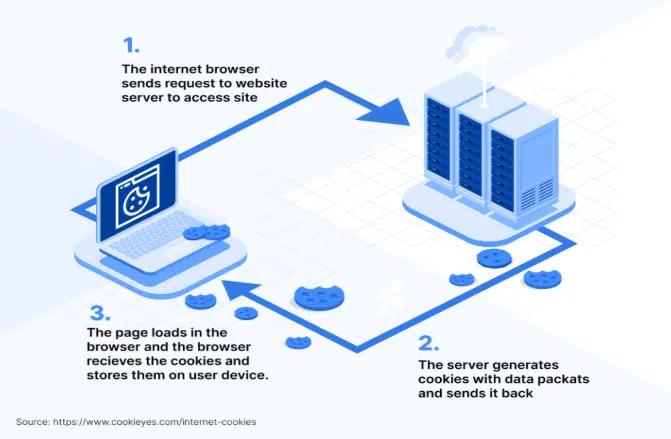
Before getting into the details of testing cookies, it’s important to to understand how cookies work. Cookies are small text files stored on a user’s device by a website or web application. They contain data that can help the website recognize users, track their activity, and customize the browsing experience. The image below perfectly summarizes how cookies actually works.
Cookie Attributes
Cookies have attributes (sometimes also referred to as flags) that are quite important because they define how the cookie works. Let’s review the most common attributes of a cookie:
- Session ID: Unique random string used to identify and match the session between the client and the web server
- Expires: Defines when the cookie is set to expire
- Domain: Specifies the domain (or domains) where the cookie is valid to be used
- Path: Specifies the resource or path where the cookie is valid to be used
- HTTPOnly: When enabled, this will prevent client side APIs such as JavaScript from accessing the cookie. This mitigates the threat of many cross-site scripting (XSS) attacks.
- Secure: When enabled, this attribute requires the cookie to be sent only using HTTPS while unencrypted connections like HTTP are not allowed which makes the cookie less vulnerable to theft.
- Session: Defines that the cookie is temporary and expires when the browser is closed
- SameSite: This attribute determines whether cookies are sent with cross-site requests. It can have the following values:
- Strict: The cookie is sent only when the request originates from the same domain.
- Lax: The cookie is sent for requests to the same domain, even if the request originates from a different domain (e.g., when following a link).
- None: The cookie is sent with cross-site requests, allowing third-party cookies.
Types Of Cookies
The type of cookies refers to the way cookies are categorized based on their purpose, lifespan, or origin. These categories help define how cookies function, what data they store, and how they are used in web applications. Let’s review the most common types of cookies with examples from real life below.
Session Cookies
Session cookies are temporary cookies that are created when a user visits a website and deleted once the browser is closed. These cookies don’t have an Expires or Max-Age attribute, so they only last for the duration of the session. They are used to maintain session state, such as keeping items in a shopping cart or remembering navigation preferences during a visit.
Example: A website’s session cookie that keeps a user logged in while browsing various pages.Set-Cookie: session_id=abc123; Path=/; HttpOnly; Secure
Persistent Cookies
Cookies that remain on a user’s device until a specified expiration date or until the user deletes them. They are commonly used to remember preferences or login information across sessions. These cookies store data that needs to persist across multiple visits, such as login details, user preferences, or language settings.
Example: A “remember me” cookie for login, allowing the user to stay logged in across visits.Set-Cookie: remember_user=true; Expires=Wed, 13 Nov 2024 12:00:00 GMT; Path=/; Secure
Third-Party Cookies
Cookies set by a domain other than the one the user is currently visiting. These are often used by advertisers, analytics services, and social media platforms to track user behavior across websites. They are primarily used for tracking and targeted advertising.
Example: A cookie set by an ad network on a news website to track the user’s browsing habits.
Set-Cookie: ad_network_id=xyz456; Domain=adnetwork.com; Path=/; SameSite=None; Secure
Secure Cookies
Cookies with the Secure attribute, meaning they are only sent over HTTPS connections. This protects them from being intercepted in plaintext. Secure cookies are often used for sensitive information, such as session IDs, to ensure secure transmission.
Example: A secure cookie used by a banking app to maintain session state over HTTPS.
Set-Cookie: bank_session_id=secure123; Secure; HttpOnly; Path=/
HTTPOnly Cookies
Cookies with the HttpOnly attribute cannot be accessed by JavaScript on the client side, adding an extra layer of security. They are used to store sensitive data and protect against cross-site scripting (XSS) attacks.
Example: A login token stored in an HttpOnly cookie to prevent exposure to client-side scripts.Set-Cookie: auth_token=login123; HttpOnly; Secure; Path=/
Same Site Cookies
Cookies with the SameSite attribute control whether they are sent with cross-site requests. This helps prevent cross-site request forgery (CSRF) attacks by restricting when cookies are included in requests from other sites.
- Strict: The cookie is sent only with requests originating from the same site.
- Lax: The cookie is sent with requests to the same site, even when initiated from a different site (e.g., following a link).
- None: The cookie is sent with cross-site requests, allowing third-party cookies.
Example: A cookie for managing user sessions, sent only when the user is on the same site.Set-Cookie: user_session=sameSiteTest; SameSite=Strict; Path=/
Zombie Cookies
Cookies that are automatically recreated after deletion. These cookies may be stored in non-standard locations, such as Flash storage or HTML5 storage, allowing them to regenerate. While sometimes used for tracking, they are often seen as intrusive because they are difficult for users to delete.
Example: A tracking cookie that reappears after deletion due to a backup in alternative storage. Note: This practice is controversial and generally avoided by reputable companies.
Why It Is Important To Test Cookies?
Testing cookies is a critical part of ensuring the quality, security, and functionality of a web application. Cookies play an essential role in managing sessions, storing user preferences, and enabling features like personalized experiences or targeted advertising. Neglecting proper cookie testing can lead to vulnerabilities, poor user experiences, or non-compliance with data protection laws. Here are the key obvious (but no less important) reasons why cookies testing should be a routine for both testers and developers:
- Ensuring Functionality. Cookies are vital for maintaining user sessions, storing preferences, and enabling features like “remember me” or shopping carts.
- Maintaining Security. Cookies can be a target for cyberattacks, such as:
– Cross-Site Scripting (XSS): If a cookie lacks theHttpOnlyattribute, it may be accessible via malicious scripts.
– Session Hijacking: IfSecureis not set, cookies may be transmitted over an unsecured connection (HTTP), making them vulnerable to interception. - Validating Privacy and Compliance. Data protection laws such as GDPR, CCPA, and ePrivacy Directive impose strict regulations on cookie usage, especially for tracking or third-party cookies.
- Improving User Experience. Cookies influence how users interact with a website by remembering their settings, language preferences, or login credentials.
- Optimizing Performance. Mismanaged cookies can slow down a website or create issues, such as cookies growing too large or unnecessary cookies being set.
- Cross-Browser and Cross-Platform Compatibility. Cookies may behave differently in various browsers or platforms (e.g., desktop vs. mobile).
- Preventing Cookie Abuse. Testing helps identify and mitigate cookie-related abuse, such as:
– Third-party cookies tracking users without their consent.
– Cookies being exploited for injecting malicious data.
How To Test Cookies
Below I’ve created a comprehensive table outlining how I like to test cookies, the different things to look for, and the tools or methods I use for each scenario.
| Test Scenario | Objective | How to Test | Tools/Methods |
|---|
| 1. Cookie Creation | Verify if cookies are being created correctly. | – Log in or perform actions that trigger cookies. – Check if the cookie is created with proper values. | Browser DevTools (Application tab), Postman |
| 2. Cookie Attributes | Ensure attributes (HttpOnly, Secure, SameSite, Path, Domain) are set correctly. | – Inspect the cookie attributes in DevTools. – Simulate HTTP/HTTPS requests to test Secure. | Browser DevTools, Fiddler, Postman |
| 3. Cookie Persistence | Check if session cookies expire on browser close and persistent cookies retain data. | – Close and reopen the browser to verify session cookie deletion. – Check the Expires value for persistent cookies. | Browser DevTools, EditThisCookie |
| 4. Cookie Modification | Ensure cookies cannot be tampered with maliciously. | – Edit a cookie value manually (e.g., session token) and check how the system responds. | EditThisCookie, Browser DevTools |
| 5. Cookie Deletion | Verify if cookies are deleted on logout or manual actions. | – Log out of the app or clear cookies from the browser. – Refresh the page to see if cookies persist. | Browser DevTools |
| 6. HttpOnly Attribute | Ensure cookies with HttpOnly cannot be accessed via JavaScript. | – Try accessing cookies using document.cookie in the browser console. | Browser Console |
| 7. Secure Attribute | Ensure cookies are transmitted only over HTTPS. | – Test on an HTTP site and verify the cookie is not sent. – Check HTTPS behavior. | Fiddler, Postman |
| 8. SameSite Attribute | Prevent cross-site attacks by validating SameSite behavior. | – Simulate cross-site requests to verify Lax, Strict, or None settings. | Fiddler, Postman |
| 9. Cookie Size | Ensure cookies don’t exceed the size limit (usually 4KB). | – Add data to the cookie and test application response when the size limit is exceeded. | Browser DevTools |
| 10. Cross-Browser Compatibility | Verify cookie behavior across different browsers. | – Test cookie creation, attributes, and usage on multiple browsers (e.g., Chrome, Firefox, Safari, Edge). | Manual Testing |
| 11. Expiry Testing | Check if cookies expire at the intended time. | – Set short expiry times and monitor cookie deletion after the timer. | Browser DevTools |
| 12. Third-Party Cookies | Verify the handling and behavior of third-party cookies. | – Check for third-party cookies and validate their creation and expiration. | Browser DevTools, Fiddler |
| 13. Privacy/Compliance Testing | Ensure cookies comply with privacy regulations (GDPR, CCPA). | – Verify consent mechanisms (cookie banners). – Ensure only essential cookies are set before consent. | Browser DevTools |
| 14. Performance Testing | Ensure cookies don’t degrade performance or cause slowdowns. | – Inspect total cookie size and count. – Monitor load times with and without cookies. | Lighthouse, Browser Performance Tools |
| 15. Deletion on Browser Clear | Verify that cookies are removed when clearing browser data. | – Clear browsing data and check if cookies are deleted. | Manual Testing, Browser DevTools |
Conclusion
Thoroughly testing cookies is an essential step in delivering secure, compliant, and user-friendly web applications. By following the guidelines outlined above, you can ensure that your web applications make optimal and secure use of cookies.
If you need assistance with testing or securing your web applications, reach out to Trailhead for expert advice and guidance.