Easy Setup For Debugging Cross-Platform Ionic Mobile Apps

When you are building a cross-platform mobile app, being able to debugger that application is crucial to make sure you’ve built something that is robust and works well on all devices. When you’re using Ionic and Angular, that can be a little more effort than it is when you’re using IDEs like XCode, Visual Studio, and Android Studio.

In this blog, I want to show you how to debug an Ionic app built with Angular using Visual Studio Code and the Ionic extension. The process I will show you will help you identify and resolve coding issues and maintain a smooth user experience across various devices and platforms. It also gives you access to Visual Studio Code’s powerful debugging tools, making it easier to pinpoint and fix problems effectively.

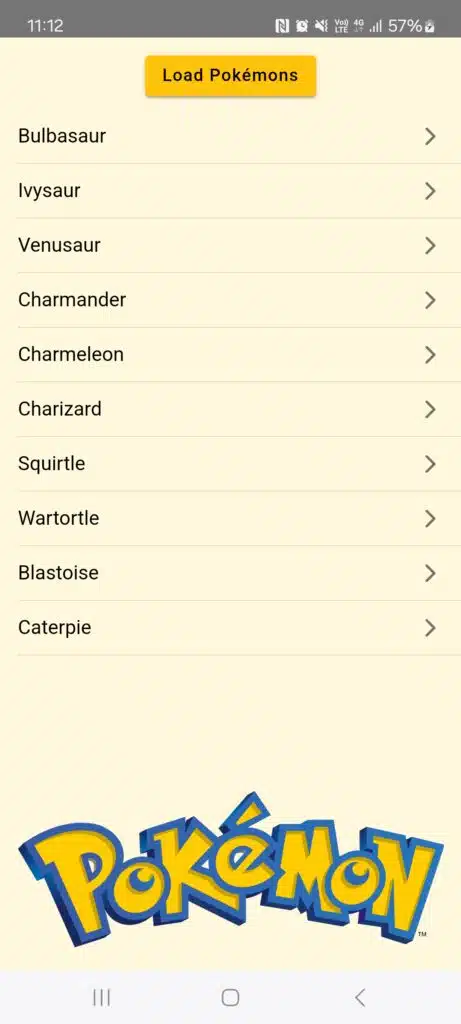
For the examples in this blog, we are going to build an app that uses the PokéApi to get a list of 10 Pokémon to display.

How to Debug an Ionic App in the Browser

1. Put a debugger statement in line 30 (home.page.ts).

2. Run the command npm run start in the terminal.
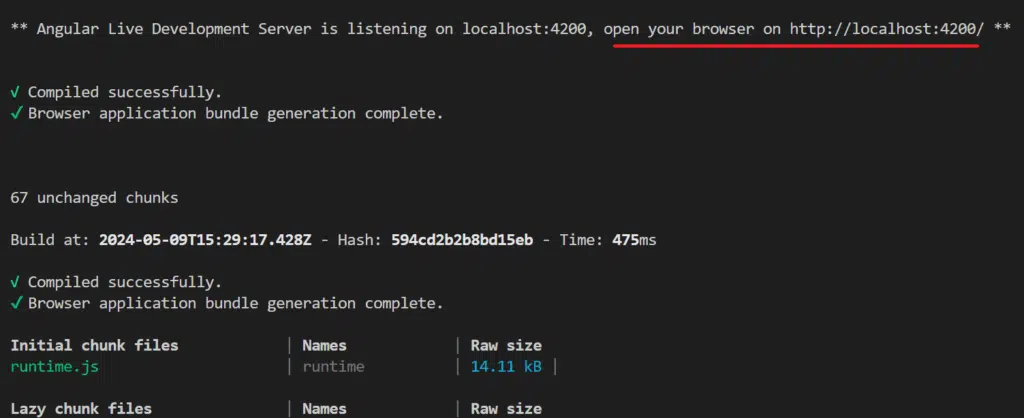
3. Open localhost:4200 in your browser (I recommend using Google Chrome).

4. Press F12 in the browser to open the Developer Tools, and select the option to display as a mobile device.
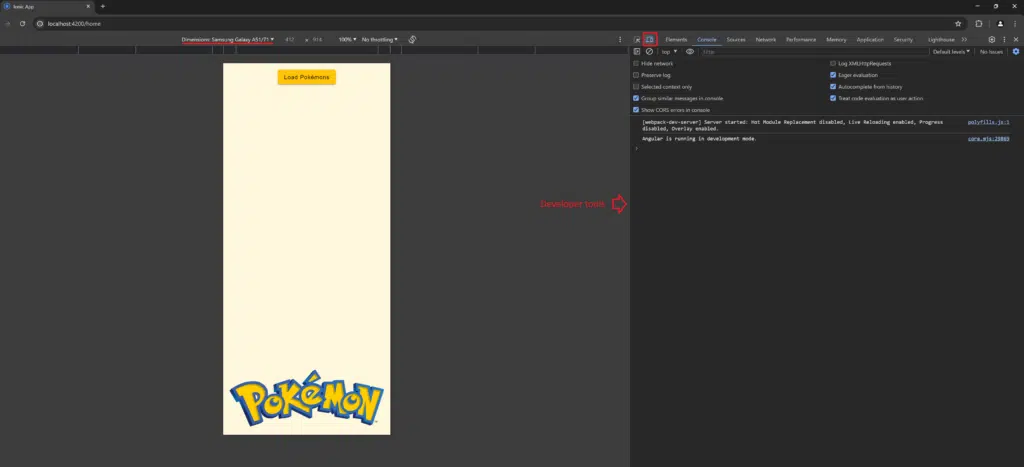
5. Click the Load Pokémons button.

The debugger tool is enabled when the browser detects the debugger in the line 30.

If we click the Step Over button, we can jump to the next line. Also, we can see in the Locals section of our debugger the result of calling the API at https://pokeapi.co/api/v2/pokemon?limit=10&offset=0.

Debug an Ionic App on Android Device (from Windows)

1. Enable Developer options on the phone and USB debugging.

2. Install the Ionic official extension in Visual Studio Code.

3. Run ionic build.

4. Run npx cap copy && npx cap sync && npx cap open android. (Reference link)

npx cap open android will open the project on Android Studio.

5. Run the app using Android Studio.

6. Return to Visual Studio Code and Select the Ionic extension.

7. Select Debug > [app name].

8. Put a breakpoint in the line 30 (home.page.ts). Note that you don’t need to use the debugger statement when debugging this way.

9. Click the Load Pokémons button.

The breakpoint will be hit by the debugger, and one again we’ll see the result of calling the API at https://pokeapi.co/api/v2/pokemon?limit=10&offset=0.

Debug an Ionic App on iOS Device (from Mac)

1. Open the project in Visual Studio Code.

For the iOS version, the Ionic extension doesn’t allow us to debug in the same way as the Windows version on Android but the XCode can show the console.log.

2. Add console.log in the lines 29 and 41 (pokemon-detail.page.ts).

3. Run ionic build.

4. Run npx cap copy && npx cap sync && npx cap open ios. (Reference link)

npx cap open ios will open the project on XCode.

5. Select an available device or simulator and run the app using XCode.

To access the Pokemon-Detail page, tap any pokémon in the list (for instance, tap Charmander).

The console.log events will be shown in the XCode console:

While Xcode doesn’t allow setting breakpoints, you can use browser-based debugging instead. To initiate the app on a Mac, use the command sudo npm run start. Once the app is running, you can follow the steps described above in “How to Debug an Ionic App in the Browser.” Open the browser’s developer tools to set breakpoints, inspect elements, and monitor console logs. This approach leverages the powerful debugging features available in browsers, ensuring an efficient debugging process.

Conclusion

Debugging Ionic applications on both Android and iOS platforms introduces unique challenges due to the inherent differences in operating systems and hardware configurations. However, leveraging tools such as Visual Studio Code and its Ionic extension along with Android Studio, Chrome DevTools, and Xcode can significantly streamline the debugging process.

Despite the complexity, the evolving tools and debugging practices outlined above can help developers mitigate these challenges, facilitating the easier debugging of cross-platform Ionic applications.

NOTE: All the code from the demos in this blog is available on Trailhead’s GitHub.

Picture of Junior Saravia

Junior Saravia

Junior Saravia earned his B.S. in Systems Engineering from the National University of Engineering in Lima, Peru. He has 5 years of experience in cross-platform Mobile Development using Xamarin and now .NET MAUI. He has been focused on keeping up-to-date with new technology trends such as IoT, microcontrollers, and various coding best practices. His strong collaboration and adaptability to face up to challenging projects have proven his ability to offer valuable solutions to clients through complex technologies. Beyond the realm of technology, Junior enjoys practicing soccer, swimming, and the freedom of biking outdoors.

Free Consultation

Sign up for a FREE consultation with one of Trailhead's experts.

"*" indicates required fields

This field is for validation purposes and should be left unchanged.

Related Blog Posts

We hope you’ve found this to be helpful and are walking away with some new, useful insights. If you want to learn more, here are a couple of related articles that others also usually find to be interesting:

Our Gear Is Packed and We're Excited to Explore With You

Ready to come with us? 

Together, we can map your company’s software journey and start down the right trails. If you’re set to take the first step, simply fill out our contact form. We’ll be in touch quickly – and you’ll have a partner who is ready to help your company take the next step on its software journey. 

We can’t wait to hear from you! 

Main Contact

This field is for validation purposes and should be left unchanged.

Together, we can map your company’s tech journey and start down the trails. If you’re set to take the first step, simply fill out the form below. We’ll be in touch – and you’ll have a partner who cares about you and your company. 

We can’t wait to hear from you! 

Montage Portal

Montage Furniture Services provides furniture protection plans and claims processing services to a wide selection of furniture retailers and consumers.

Project Background

Montage was looking to build a new web portal for both Retailers and Consumers, which would integrate with Dynamics CRM and other legacy systems. The portal needed to be multi tenant and support branding and configuration for different Retailers. Trailhead architected the new Montage Platform, including the Portal and all of it’s back end integrations, did the UI/UX and then delivered the new system, along with enhancements to DevOps and processes.

Logistics

We’ve logged countless miles exploring the tech world. In doing so, we gained the experience that enables us to deliver your unique software and systems architecture needs. Our team of seasoned tech vets can provide you with:

Custom App and Software Development

We collaborate with you throughout the entire process because your customized tech should fit your needs, not just those of other clients.

Cloud and Mobile Applications

The modern world demands versatile technology, and this is exactly what your mobile and cloud-based apps will give you.

User Experience and Interface (UX/UI) Design

We want your end users to have optimal experiences with tech that is highly intuitive and responsive.

DevOps

This combination of Agile software development and IT operations provides you with high-quality software at reduced cost, time, and risk.

Trailhead stepped into a challenging project – building our new web architecture and redeveloping our portals at the same time the business was migrating from a legacy system to our new CRM solution. They were able to not only significantly improve our web development architecture but our development and deployment processes as well as the functionality and performance of our portals. The feedback from customers has been overwhelmingly positive. Trailhead has proven themselves to be a valuable partner.

– BOB DOERKSEN, Vice President of Technology Services
at Montage Furniture Services

Technologies Used

When you hit the trails, it is essential to bring appropriate gear. The same holds true for your digital technology needs. That’s why Trailhead builds custom solutions on trusted platforms like .NET, Angular, React, and Xamarin.

Expertise

We partner with businesses who need intuitive custom software, responsive mobile applications, and advanced cloud technologies. And our extensive experience in the tech field allows us to help you map out the right path for all your digital technology needs.

  • Project Management
  • Architecture
  • Web App Development
  • Cloud Development
  • DevOps
  • Process Improvements
  • Legacy System Integration
  • UI Design
  • Manual QA
  • Back end/API/Database development

We partner with businesses who need intuitive custom software, responsive mobile applications, and advanced cloud technologies. And our extensive experience in the tech field allows us to help you map out the right path for all your digital technology needs.

Our Gear Is Packed and We're Excited to Explore with You

Ready to come with us? 

Together, we can map your company’s tech journey and start down the trails. If you’re set to take the first step, simply fill out the contact form. We’ll be in touch – and you’ll have a partner who cares about you and your company. 

We can’t wait to hear from you! 

Thank you for reaching out.

You’ll be getting an email from our team shortly. If you need immediate assistance, please call (616) 371-1037.