In a previous post on a generic builder pattern in C#, I shared a simple approach for creating objects using a generic builder. That solution works well in testing scenarios or internal tools, where developers already understand the rules of the game.
But for production code—especially when exposing public APIs—we need something more robust. A generic builder leaves too much room for error: overwriting properties, missing dependencies, or combining options incorrectly. In these cases, type safety and a guided interface aren’t just nice-to-haves—they’re essential.
That’s where the Optional Progressive Builder pattern comes in.
The Problem with Generic Builders
Consider this example from the generic builder approach:
var myCar = Create<Car>(with => {
    with.Make = "Toyota";
    with.Model = "Corolla";
    with.Year = 2021;
    with.Make = "Honda"; // Oops! We just overwrote Make
});
Nothing prevents setting the same property multiple times. Developers don’t get compile-time guidance, and there’s no clear indication of property relationships or valid combinations. For internal use, that might be acceptable. For public APIs? Not so much.
We need a way to guide the user through the building process, enforcing rules at compile time and making the API self-documenting.
The Optional Progressive Builder Solution
The Optional Progressive Builder pattern solves these problems by creating a type-safe, fluent interface that:
- Allows properties to be set optionally
- Prevents properties from being set multiple times
- Uses the type system to enforce rules at compile time
- Provides IntelliSense guidance, making the API self-documenting
This pattern is particularly powerful when building fluent interfaces that require progressive narrowing of choices.
Implementation
Let’s implement this pattern for our Car class. Note that we’re keeping the code simple for clarity – production implementations would include proper validation and error handling.
public record Car(string? Make = null, string? Model = null,
                  int? Year = null, string? Color = null);

public abstract class CarBuilderBase
{
    protected readonly Car _car;
    protected CarBuilderBase(Car car) => _car = car;
    public Car Build() => _car;
}

public class CarBuilder : CarBuilderBase
{
    public CarBuilder() : base(new Car()) { }

    public CarMakeBuilder WithMake(string make) =>
        new(_car with { Make = make });

    public CarModelBuilder WithModel(string model) =>
        new(_car with { Model = model });

    public CarYearBuilder WithYear(int year) =>
        new(_car with { Year = year });

    public CarColorBuilder WithColor(string color) =>
        new(_car with { Color = color });
}
Specialized Builders
Each builder only exposes the remaining available options:
public class CarMakeBuilder : CarBuilderBase
{
    public CarMakeBuilder(Car car) : base(car) { }

    public CarMakeModelBuilder WithModel(string model) =>
        new(_car with { Model = model });

    public CarMakeYearBuilder WithYear(int year) =>
        new(_car with { Year = year });

    public CarMakeColorBuilder WithColor(string color) =>
        new(_car with { Color = color });
}

public class CarModelBuilder : CarBuilderBase
{
    public CarModelBuilder(Car car) : base(car) { }

    public CarModelMakeBuilder WithMake(string make) =>
        new(_car with { Make = make });

    public CarModelYearBuilder WithYear(int year) =>
        new(_car with { Year = year });

    public CarModelColorBuilder WithColor(string color) =>
        new(_car with { Color = color });
}
Combination Builders
When multiple properties have been set, the builder name reflects this:
public class CarMakeModelBuilder : CarBuilderBase
{
    public CarMakeModelBuilder(Car car) : base(car) { }

    public CarMakeModelYearBuilder WithYear(int year) =>
        new(_car with { Year = year });

    public CarMakeModelColorBuilder WithColor(string color) =>
        new(_car with { Color = color });
}

// ... similar implementations for all 16 combinations
Usage Examples
Using this builder feels natural and prevents errors:
// Start with Make
var car1 = new CarBuilder()
    .WithMake("Toyota")
    .WithModel("Corolla")
    .Build();

// Start with Year
var car2 = new CarBuilder()
    .WithYear(2024)
    .WithMake("Honda")
    .WithColor("Blue")
    .Build();

// Minimal configuration
var car3 = new CarBuilder()
    .WithModel("Civic")
    .Build();
IntelliSense Experience
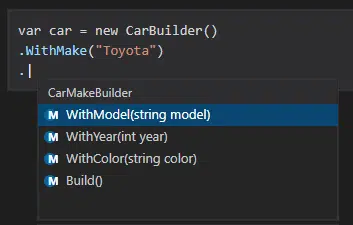
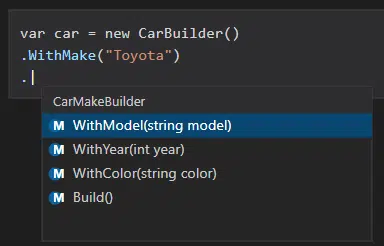
The IntelliSense support becomes a powerful feature of this pattern. After setting properties, only the remaining options are available, preventing duplicate assignments at compile time. Notice these samples:
Advantages
- Type Safety: Impossible to accidentally overwrite a property
- Self-Documenting API: IntelliSense guides developers through available options
- Compile-Time Validation: Errors caught before runtime
- Progressive Narrowing: Each step reduces complexity by showing only valid options
- Fluent Interface: Natural, readable syntax for object construction
- No Breaking Changes: Adding new optional properties doesn’t break existing code
Disadvantages
- Implementation Complexity: Number of builders grows exponentially (2^n for n properties), requiring significant upfront development and ongoing maintenance
- Learning Curve: Pattern might be unfamiliar to some developers
- Overkill for Simple Objects: Not worth the complexity for basic DTOs
When to Use This Pattern
Good candidates:
- Public APIs and SDKs consumed by external developers
- Configuration objects with complex validation rules
- Fluent query builders (think LINQ or SQL query builders)
- HTTP client configuration
- Complex domain objects with business rules
- Any scenario where preventing misuse is critical
When NOT to Use This Pattern
Avoid this pattern when:
- Building simple DTOs or POCOs
- Internal APIs with small, trusted teams
- Objects with few properties (e.g. 3)
- Rapid prototyping scenarios
- When properties have no interdependencies
Remember: when all you have is a hammer, everything looks like a nail. Consider the following simpler alternatives:
- Simple objects: Use object initializers
- Testing scenarios: Use the generic builder from our previous post
- Internal tools: Rely on team conventions and code reviews
- Few properties: Constructor or factory methods might suffice
Key Takeaways
The Optional Progressive Builder pattern gives you a type-safe, guided, and discoverable way to build objects in C#. It’s a more sophisticated alternative to generic builders—one that trades complexity for clarity, correctness, and developer experience.
At Trailhead, we use patterns like this when building APIs and SDKs that need to be robust, intuitive, and resilient to misuse. Whether you’re modernizing a legacy system or designing a greenfield API, the right construction pattern can make your code not only safer—but a joy to use.
Want to talk more about API design patterns, fluent interfaces, or modernizing your .NET applications? Reach out to us at Trailhead Technology Partners.