SignalR as a service in Azure

In a previous post, I wrote about using SignalR in AspNetCore. Today, I tried the next step up – SignalR as a service!
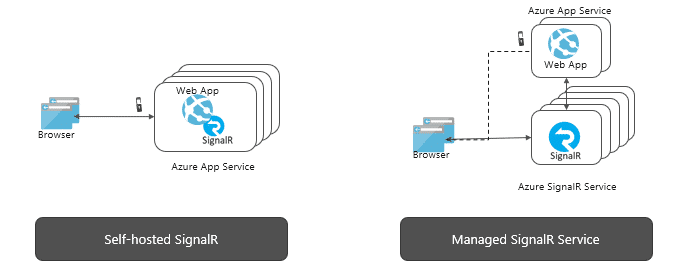
You will find the announcement here. This page has more details. So why would you want to run SignalR as a service, rather than embedding your Hubs in your API or Web back end? In short – scalability. If your service goes viral and expands to a farm, you would traditionally use a SignalR backplane, with Sql Server or Redis as a backing store. Turns out there is a lot of tricky programming behind getting this to work well, using sticky sessions and load balancing web sockets. Using the Azure SignalR service, this is all taken care of for you. There is a free tier, with one unit, or a paid tier, with multiple units, which will scale elastically. The free tier is good for 100 concurrent connection and 100,000 messages per day.
Switching to this service from regular SignalR is a breeze. First, you will want to add the Nuget package Microsoft.Azure.SignalR to your app (instead of Microsoft.AspnetCore.SignalR). Second, in your Startup.cs, add .AddAzureSignalR() to your AddSignalR.

services.AddSignalR().AddAzureSignalR();

Now, switch from UseSignalR to UseAzureSignalR.

.UseAzureSignalR(
  routes => { routes.MapHub<StopsHub>("/stophub"); });

Next, create you SignalR service in the Azure portal, and copy the Primary Connection String from it’s keys. For development, add this to your local User Secrets, like this:

"Azure:SignalR:ConnectionString": "Endpoint=<yourendpoint>;AccessKey=<yourkey>;"

When deploying your API to Azure, just add this same connection string as an app setting (with the key Azure:SignalR:ConnectionString).
That’s it! No changes to Hubs, or to your logic using IHubContexts. No changes to connections, groups, messages… and no changes to your client. Very straight forward. I did find though that I had to remove the explicit setting of HttpTransportType to WebSockets in my Angular client, leaving that setting as the default on both client and server worked. In my case, my JTW bearer authentication worked well out of the box too.
Welcome to SignalR as a Service!

Picture of John Waters

John Waters

As a highly respected and recommended technology leader, entrepreneur, and software architect extraordinaire, John Waters provides guidance for Trailhead teams and projects. His remarkable project requirements gathering and project estimation skills allow him to oversee teams that deliver client projects on time and on budget. John’s background includes over two decades of systems architecting, implementations for a range of high-performance business solutions, and speaking at conferences worldwide.

Free Consultation

Sign up for a FREE consultation with one of Trailhead's experts.

"*" indicates required fields

This field is for validation purposes and should be left unchanged.

Related Blog Posts

We hope you’ve found this to be helpful and are walking away with some new, useful insights. If you want to learn more, here are a couple of related articles that others also usually find to be interesting:

SignalR Scaling with Azure SignalR Service

SignalR is the best way to enable real-time communication in modern .NET web applications. So let's say you have built your first app with SignalR, deployed it to Azure, and everything is working great. After seeing a huge influx of new use

Read More

Hello, ASP.NET Core 2.1

UPDATE, 2018 May 30: It's alive. The dotnet team officially announces 2.1 on their blog! The newest version of ASP.NET Core will be released in just a few days, the team announced this week. They're targeting Wednesday, May 30, 2018, with a

Read More

Our Gear Is Packed and We're Excited to Explore With You

Ready to come with us? 

Together, we can map your company’s software journey and start down the right trails. If you’re set to take the first step, simply fill out our contact form. We’ll be in touch quickly – and you’ll have a partner who is ready to help your company take the next step on its software journey. 

We can’t wait to hear from you! 

Main Contact

This field is for validation purposes and should be left unchanged.

Together, we can map your company’s tech journey and start down the trails. If you’re set to take the first step, simply fill out the form below. We’ll be in touch – and you’ll have a partner who cares about you and your company. 

We can’t wait to hear from you! 

Thank you for reaching out.

You’ll be getting an email from our team shortly. If you need immediate assistance, please call (616) 371-1037.