This blog is presented as a part of C# Advent 2025. Follow the link to check out the rest of the excellent C# and .NET content coming out in 2 blogs per day between December 1 and 25.Wouldn’t it be nice if I could whip up a quick .NET mail merge utility that could send out a nice HTML-formatted email to all of your customers, signed by each of their account managers? In this blog, I’ll show you how a little Scriban magic, a dash of MailKit, and a simple CSV file turned into a fully automated holiday mailer.
Scriban
Scriban is a lightweight scripting language and engine for .NET built for text templating. Among its many uses, it’s a great way to build dynamic mail merge documents. The scripting engine is extremely versatile, going well past simple field substitution, with support for functions, loops, arithmetic, expressions, formatting and much more. The documentation is excellent. For our purposes, we will just use the basics.
The Template
Here’s the kind of email I would like to produce:

Below is the HTML template that I created for this, using the {{ }} syntax for where I will substitute in dynamic values, see for instance {{first_name}}. By default Scriban uses snake_case but this can be configured in many ways. I just have one object with properties for each variable, but you can have much more complex objects with deeply nested properties, arrays of objects and so on.
<!DOCTYPE html>
<html lang="en">
  <head>
    <meta charset="UTF-8">
    <meta name="viewport" content="width=device-width, initial-scale=1.0">
    <title>Holiday Greetings</title>
  </head>
  <body style="margin: 0; padding: 0; font-family: Arial, sans-serif; background-color: #f4f4f4;">
    <table width="100%" cellpadding="0" cellspacing="0" border="0" style="background-color: #f4f4f4; padding: 20px;">
      <tr>
        <td align="center">
          <table width="600" cellpadding="0" cellspacing="0" border="0" style="background-color: #ffffff; border-radius: 10px; box-shadow: 0 4px 6px rgba(0,0,0,0.1);">
            <tr>
              <td style="background: linear-gradient(135deg, #c94b4b 0%, #4b134f 100%); padding: 40px; text-align: center; border-radius: 10px 10px 0 0;">
                <h1 style="color: #ff0000; margin: 0; font-size: 36px; text-shadow: 2px 2px 4px rgba(0,0,0,0.5); font-weight: bold;">
                  🎄 Season's Greetings! 🎄
                </h1>
              </td>
            </tr>
            <tr>
              <td style="padding: 40px 30px;">
                <p style="font-size: 18px; color: #333333; margin: 0 0 20px 0;">
                  Dear {{first_name}} {{last_name}},
                </p>
                <p style="font-size: 16px; color: #555555; line-height: 1.6; margin: 0 0 20px 0;">
                  As the holiday season fills the air with joy and wonder, we wanted to take a moment
                  to extend our warmest wishes to you and everyone at <strong>{{company}}</strong>.
                </p>
                <p style="font-size: 16px; color: #555555; line-height: 1.6; margin: 0 0 20px 0;">
                  Thank you for your partnership and collaboration throughout the year. We truly
                  appreciate working with talented professionals like you.
                </p>
                <p style="font-size: 16px; color: #555555; line-height: 1.6; margin: 0 0 30px 0;">
                  May this festive season bring you peace, happiness, and prosperity. Here's to
                  a wonderful holiday season and an even brighter New Year ahead!
                </p>
                <!-- Christmas decoration -->
                <div style="text-align: center; font-size: 40px; margin: 30px 0;">
                  ⛄ 🎁 ⭐ 🔔 ❄️
                </div>
                <p style="font-size: 16px; color: #555555; line-height: 1.6; margin: 30px 0 20px 0;">
                  Warm wishes,
                </p>
                <p style="font-size: 16px; color: #555555; margin: 0;">
                  <strong>{{from_first_name}} {{from_last_name}}</strong>
                </p>
              </td>
            </tr>
            <!-- Footer -->
            <tr>
              <td style="background-color: #2d5016; padding: 20px; text-align: center; border-radius: 0 0 10px 10px;">
                <p style="color: #ffffff; font-size: 14px; margin: 0;">
                  🎅 Happy Holidays from our family to yours! 🎅
                </p>
              </td>
            </tr>
          </table>
        </td>
      </tr>
    </table>
  </body>
</html>
The Address File
Now i will need a data file for the mail merge. This can go in a simple CSV like the sample below:
FirstName,LastName,Company,Title,Email,FromFirstName,FromLastName
Alice,Johnson,Acme Corp,VP of Engineering,alice.johnson@example.com,John,Smith
Bob,Williams,Tech Solutions,CTO,bob.williams@example.com,John,Smith
Carol,Davis,Innovation Labs,Senior Developer,carol.davis@example.com,John,Smith
David,Miller,Cloud Systems,DevOps Engineer,david.miller@example.com,Jill,Smith
Emma,Wilson,Digital Ventures,Product Manager,femma.wilson@example.com,Jack,Smith
I’m using the CsvHelper Nuget Package to read this data file into an array of Address records.
record AddressRecord(
    string FirstName,
    string LastName,
    string Company,
    string Title,
    string Email,
    string FromFirstName,
    string FromLastName
);
I will pass in the path to the CSV file on the command line, as well as the name of the email template (in the Templates folder). These lines of code will read the HTML template and CSV records:
static async Task Main(string[] args) {
  string csvPath = args[0];
  string templateName = args[1];
  string templatePath = Path.Combine("Templates", templateName);

  if (!File.Exists(csvPath)) {
    Console.WriteLine($"Error: CSV file not found at {csvPath}");
    return;
  }

  if (!File.Exists(templatePath)) {
    Console.WriteLine($"Error: Template file not found at {templatePath}");
    return;
  }

  var addresses = ReadAddressesFromCsv(csvPath);

  string templateContent = await File.ReadAllTextAsync(templatePath);

  // TODO - merge and send!
}

static List < AddressRecord > ReadAddressesFromCsv(string filePath) {
  using
  var reader = new StreamReader(filePath);
  using
  var csv = new CsvReader(reader, new CsvConfiguration(CultureInfo.InvariantCulture));
  return [..csv.GetRecords < AddressRecord > ()];
}
Merging the Data and Template
The way I set this up, the mail merge becomes almost trivial. I load the Scriban template by parsing my HTML template content, then just loop over the addresses from the CSV file and for each run, passing in the address to template.Render!
var template = Template.Parse(templateContent);

foreach (var address in addresses)
{
  var mergedContent = template.Render(address);
}
Sending the Email
Now that I can create the merged email message bodies, I need a way to send these. MailKit is a nice, modern SMTP client. I will use SendGrid as my SMTP server. I will need some settings for the SMTP client, like the server URL, port, username, password and so on. Some are secret and will go in user secrets, some are not and will go in appSettings.json. I can combine them all in one Options object:
class SmtpOptions
{
    public string Host { get; set; } = string.Empty;
    public int Port { get; set; } = 587;
    public string Username { get; set; } = string.Empty;
    public string Password { get; set; } = string.Empty;
    public string FromEmail { get; set; } = string.Empty;
    public string FromName { get; set; } = string.Empty;
    public bool EnableSsl { get; set; } = true;
    public string? OverrideEmail { get; set; }
}
For testing, I also added an OverrideEmail, which will be used instead of the real emails in my address (if specified).
I can get my appSettings and secrets combined into my Options object with the .NET configuration system, like this:
var configuration = new ConfigurationBuilder()
  .SetBasePath(Directory.GetCurrentDirectory())
  .AddJsonFile("appsettings.json", optional: false)
  .AddUserSecrets < Program > ()
  .Build();

var smtpOptions = new SmtpOptions();
configuration.GetSection("Smtp").Bind(smtpOptions);

if (!string.IsNullOrWhiteSpace(smtpOptions.OverrideEmail)) {
  Console.WriteLine($"\n[!] OVERRIDE MODE: All emails will be sent to {smtpOptions.OverrideEmail}\n");
}
Of course, in a production environment, those user secrets could go in something like an Azure Keyvault, AWS Secrets Manager, or at least some environment variables. For development time, my appSettings.json file looks like this:
{
  "Smtp": {
    "Host": "smtp.sendgrid.net",
    "Port": 587,
    "FromEmail": "santa@trailheadtechnology.com",
    "FromName": "Christmas Card Sender",
    "EnableSsl": true,
    "OverrideEmail": "john.waters@trailheadtechnology.com"
  }
}
Now that I have the addresses, the parsed template and the smtp options, we can get the job finished:
using(var client = new SmtpClient()) {
  try {
    await client.ConnectAsync(
      smtpOptions.Host,
      smtpOptions.Port,
      smtpOptions.EnableSsl ? SecureSocketOptions.StartTls : SecureSocketOptions.None);

    await client.AuthenticateAsync(smtpOptions.Username, smtpOptions.Password);

    foreach(var address in addresses) {
      try {
        var mergedContent = template.Render(address);

        var message = new MimeMessage();
        message.From.Add(new MailboxAddress(smtpOptions.FromName, smtpOptions.FromEmail));

        var recipientEmail = string.IsNullOrWhiteSpace(smtpOptions.OverrideEmail) ?
          address.Email :
          smtpOptions.OverrideEmail;

        message.To.Add(new MailboxAddress($"{address.FirstName} {address.LastName}", recipientEmail));
        message.Subject = "Season's Greetings and Best Wishes for the Holidays!";

        var bodyBuilder = new BodyBuilder {
          HtmlBody = mergedContent
        };

        message.Body = bodyBuilder.ToMessageBody();

        await client.SendAsync(message);
      } catch (Exception ex) {
        Console.WriteLine($"✗ Failed to send to {address.Email}: {ex.Message}");
      }
    }
  } finally {
    if (client.IsConnected) {
      await client.DisconnectAsync(true);
    }
  }
}
Putting It All Together
Combining these steps, here are all of the Nuget packages I needed:
<PackageReference Include="CsvHelper" Version="33.1.0" />
<PackageReference Include="MailKit" Version="4.14.1" />
<PackageReference Include="Microsoft.Extensions.Configuration.Binder" Version="10.0.0" />
<PackageReference Include="Microsoft.Extensions.Configuration.Json" Version="10.0.0" />
<PackageReference Include="Microsoft.Extensions.Configuration.UserSecrets" Version="10.0.0" />
<PackageReference Include="Scriban" Version="6.5.2" />
Here is the project structure:
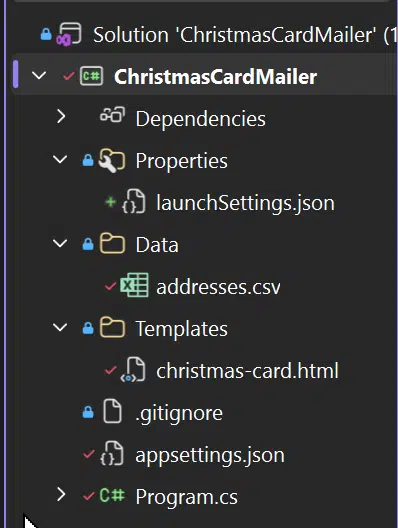
You can find the full source code for this project on Trailhead’s GitHub.
Ho Ho Ho!
That’s a (Christmas) wrap! Email automation is just one example of how thoughtful engineering can simplify your systems. If you’d like guidance implementing patterns like this in your own applications, the Trailhead team is here to help. Connect with us and let’s get your project moving.
Happy holidays, and happy mail merge from all of us at Trailhead!